 loungepad
Download
loungepad
Download
Turn a Windows 11 PC into a console.
Your games, your apps, your whole PC — all from the couch, with nothing in your hands but a controller.
Free, for Windows 11
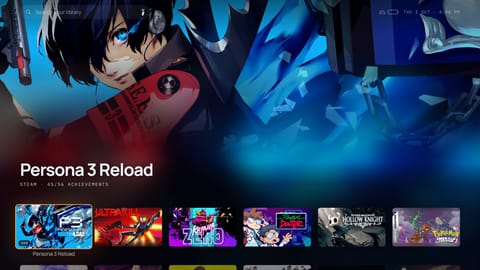
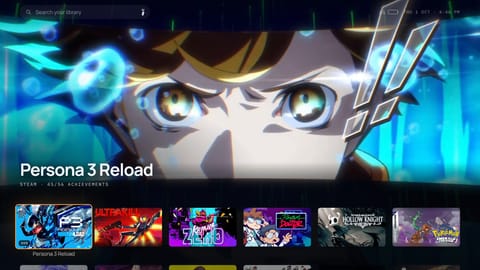
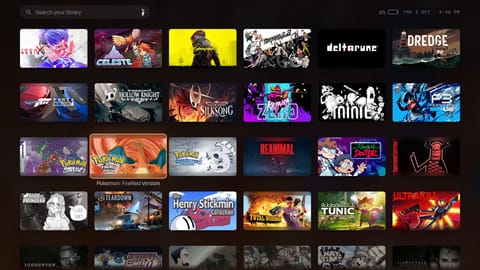
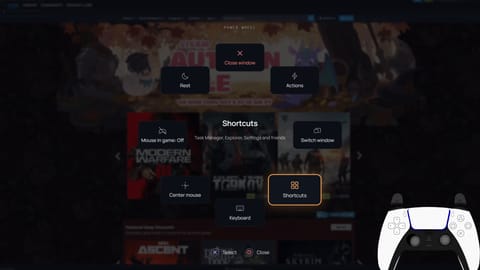
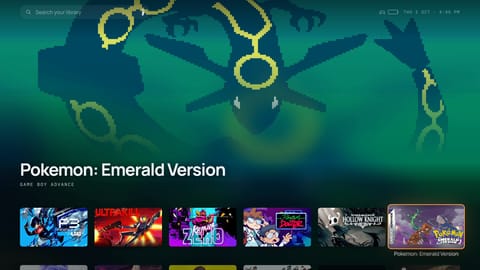

Your library
The game you’re on fills the screen, with your recent games below.
Trailers
Rest on a game and its trailer plays behind it.
Every game you own
Steam, Epic, GOG, Xbox and your retro games, in one place.
The Power Wheel
One button for everything else Windows needs, even mid-game.
Retro games too
Your classic games, with box art, next to everything else.
A page for every game
Art, ratings and trailers, filled in for you.
What it does
Built so you never walk over to the desk.
Most couch apps stop once your game starts. Loungepad keeps going: your controller runs the whole PC, not just the menu. Pick any screen to see it up close.
01
Everything a console does.
Like a console
02
And it’s still your PC.
Still a PC
03
And a few things no console will.
What a console can’t doControllers
Any controller. Every button drawn as yours.
Xbox, PlayStation and Switch Pro controllers all work, and so do a keyboard and mouse. The buttons on screen always match the controller in your hands — pick up a PlayStation controller and the green A becomes a cross.
Xbox
The buttons, as they look on this controller
Plug in a controller and press any button: this page will show its buttons, and you can browse it from the couch.
Colour · Ember
Pick a colour for the app. Go on, try one here.
The left stick is the mouse.Slow and precise near the centre, fast when you push all the way. Set the speed to suit you.
Left and right click.Click anything in Windows. The right stick scrolls.
Xbox button: the Power Wheel.Tap it from anywhere, even mid-game, to switch windows, close what's stuck or go to sleep. Hold it to come back to Loungepad.
View: the on-screen keyboard.Type a search, a password or a message. Text boxes bring it up on their own.
The pointer gets out of the way.Use the D-pad and the pointer hides. Move the stick and it's back.
Any button, any shortcut.Give an app's shortcut a button of its own — Y for a new browser tab, say.
The touchpad works like a laptop's.Tap to click, two fingers to scroll, pinch to zoom.
Arrow keys move.A keyboard and mouse work too, and the mouse can click anything.
Enter selects, Esc goes back.Right-click a game to open its menu.
X and Y are just X and Y.The buttons on screen turn into keys the moment you start typing.
Slash searches.Start typing a game's name and jump straight to it.
Tab opens Settings.Everything can be changed from there.
Get started
On the couch in a minute.
There's nothing else to install. Download it, open it, and answer a few quick questions with your controller while it finds your games.
Windows 11
Also runs on Windows 10
Keeps itself up to date
02
Unzip it and open LoungepadPut the folder somewhere of your own, like Documents, so it can keep itself up to date.
03
If Windows shows a warningWindows can be cautious about new apps the first time they open.
More info → Run anyway
04
Set up from the couchPick your TV, your look and your game stores with the controller while it finds your games. Connecting your stores lets Loungepad show every game you own, not just the installed ones.
Recommended
05
That's itLoungepad updates itself from then on. To remove it, just delete the folder.
Auto-update

Games are the reason you sit down.
Loungepad makes sure nothing else is a reason to stand up. Free, and one download away.
Power Wheel
Download
Get the latest version for Windows.
Select
Close